Cloud Render Farm Pricing Explained: Real Costs in 2026
Overview
Introduction
The pricing page of any cloud render farm lists a rate. For CPU jobs it might say "$0.006 per GHz-hour." For GPU jobs it might say "$0.45 per GPU-hour." If you have never run a distributed render job before, those numbers tell you almost nothing.
Most 3D artists want to answer one question before submitting: how much will this render actually cost? The answer depends on several factors the rate card never explains — how many GHz-hours a typical scene consumes, whether software licensing is bundled, what happens with failed frames, and how the billing unit maps to your actual render time.
We have processed jobs for clients in over 50 countries at Super Renders Farm, across every major render engine and software combination. This guide breaks down how cloud render farm pricing works in 2026, with worked examples for V-Ray, Redshift, Blender Cycles, and Cinema 4D, plus a breakdown of the hidden costs that commonly surprise artists on their first invoice.
Understanding the Two Core Pricing Units
Cloud render farms charge for one thing: compute time. The unit they use depends on whether your job runs on CPUs or GPUs.
GHz-hour (CPU billing): This unit measures the total processor cycles consumed by your job. If your scene renders on a machine with 44 cores running at 2.2 GHz, that machine provides 44 × 2.2 = 96.8 GHz of compute per hour. Run it for two hours and you have consumed 193.6 GHz-hours. Multiply by the farm's per-GHz-hour rate and that is your cost for that machine's contribution.
In practice, a farm distributes your frames across many machines simultaneously. A 300-frame V-Ray animation running on 30 machines accumulates GHz-hours across all nodes in parallel — which is why wall-clock time drops from days to hours, while the total GHz-hour count reflects the actual compute consumed.
GPU-hour (GPU billing): GPU jobs bill by the hour per card. If your Redshift job runs on four RTX 5090 cards for three hours, you consume twelve GPU-hours. The per-GPU-hour rate varies by GPU generation and tier. Some farms also use OctaneBench-hours for Octane renders — a unit that normalizes billing across different GPU models by comparing benchmark scores.
Understanding which unit applies to your engine is the first step in estimating any cloud render cost.
CPU Rendering Costs: V-Ray, Corona, and Arnold
V-Ray and Corona are the two dominant engines for CPU rendering on managed farms, primarily for architectural visualization, product rendering, and animation. Arnold is common in VFX and film pipelines. All three bill on GHz-hours.
Worked example — V-Ray archviz animation:
| Parameter | Value |
|---|---|
| Software | 3ds Max + V-Ray |
| Frames | 240 (10 seconds at 24fps) |
| Resolution | 1920×1080 |
| Average render time per frame | 18 minutes (medium-complexity interior) |
| Nodes assigned | 30 machines (44 cores, 2.2 GHz each) |
Each machine renders approximately 8 frames in around 2.4 hours. Total compute: 30 machines × 2.4 hours × 96.8 GHz per machine = 6,969.6 GHz-hours.
At a rate of $0.006/GHz-hour, this job costs approximately $41.82 — and completes in under three hours of wall-clock time.
Running the same scene locally on a 16-core workstation at 3.5 GHz, each frame takes roughly 45 minutes (distributed rendering scales better than single-machine rendering). The full 240-frame job would require approximately 180 hours, or 7.5 days, of uninterrupted local rendering.
Licensing note: At Super Renders Farm, V-Ray, Corona, and Arnold licenses are included in the GHz-hour rate. No separate per-job licensing fee is added. This is not universal — verify licensing terms before submitting to any service.
After Effects renders on a cloud farm are typically CPU-bound through aerender headless mode — the cost picture for AE follows the same per-node-hour math as the CPU engines above, but with codec-output and plugin-parity considerations unique to AE. Our After Effects cloud rendering setup guide covers the AE submission workflow and the cost factors specific to motion-design projects.
GPU Rendering Costs: Redshift, Octane, and V-Ray GPU
GPU rendering produces faster frame times for scenes optimized for GPU path tracing, but bills at a higher hourly rate because GPU hardware carries higher infrastructure cost.
Worked example — Redshift Cinema 4D motion design animation:
| Parameter | Value |
|---|---|
| Software | Cinema 4D + Redshift |
| Frames | 150 (motion design short) |
| Resolution | 3840×2160 (4K) |
| Average render time per frame | 4 minutes per RTX 5090 card |
| GPU cards assigned | 8 × RTX 5090 |
With 8 cards running in parallel, 150 frames complete in approximately 75 minutes of wall-clock time. Compute consumed: 8 cards × 1.25 hours = 10 GPU-hours.
At $0.45/GPU-hour, this job costs approximately $4.50 — significantly lower total cost than the V-Ray CPU example, despite the higher hourly rate, because GPU rendering finishes faster and the job is shorter.
This relationship reverses when scenes push against VRAM limits. A Redshift scene using 28 GB of VRAM has limited headroom on a 32 GB card, and if geometry or textures push over that threshold, the job will fail or fall back to slower system RAM usage. CPU rendering degrades more gradually with scene scale.
Estimated Cost Comparison by Render Type
The following table shows estimated cost ranges for 100 rendered frames at 1920×1080, medium scene complexity, on a managed farm where software licensing is included. Frame times vary by scene — use these as planning benchmarks, not guarantees.
| Engine | Mode | Avg. Frame Time | Est. Cost / 100 Frames | Notes |
|---|---|---|---|---|
| V-Ray | CPU | 15–25 min | $12–$22 | Archviz interior, GI, displacement maps |
| Corona | CPU | 12–20 min | $10–$18 | Archviz, physically based materials |
| Arnold | CPU | 20–35 min | $18–$32 | VFX, production characters, volume |
| Blender Cycles | GPU | 3–8 min | $3–$8 | Wide variance by geometry and sampling |
| Redshift | GPU | 2–6 min | $2–$6 | Cinema 4D motion design, GPU-optimized scenes |
| Octane | GPU | 2–5 min | $2–$5 | GPU path tracing, real-time workflow |
| V-Ray GPU | GPU | 3–7 min | $3–$8 | GPU-accelerated V-Ray with V-Ray assets |
For current rates, see the Super Renders Farm pricing page. Our cost-per-frame guide walks through how to estimate your specific project before submitting.
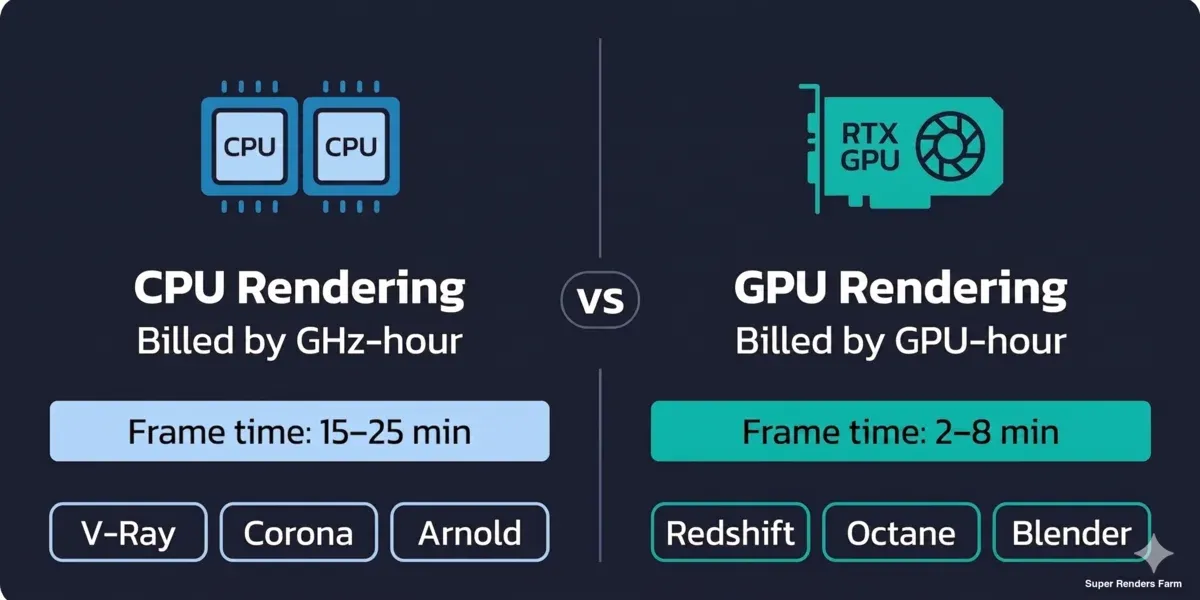
CPU vs GPU render farm billing comparison — GHz-hour for V-Ray, Corona, Arnold vs GPU-hour for Redshift, Octane, Blender
Hidden Costs to Evaluate
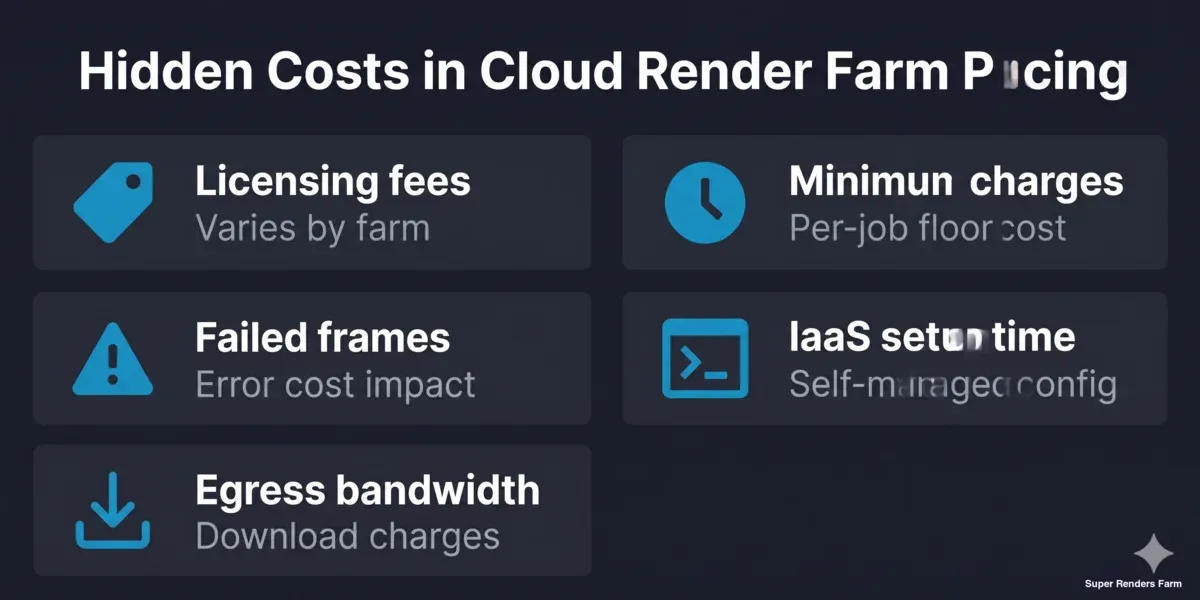
Common hidden costs in cloud render farm pricing — licensing fees, minimum charges, failed frames, IaaS setup time, egress bandwidth
The rate card covers compute. These factors can add meaningfully to the total.
Software licensing fees: IaaS-style farms — where you rent GPU machines and manage rendering yourself via remote desktop — often do not include render engine licenses. You supply your own V-Ray or Redshift license, or purchase a floating license per session. For commercial engines, this licensing cost can add meaningfully to per-session costs depending on the engine and the vendor's licensing model. Always confirm what is included.
Minimum job charges: Some services impose a minimum billing amount per job, regardless of actual compute used. If you are iterating with test renders, that minimum charge accumulates quickly. A farm without per-job minimums gives you more flexibility to run short validation renders without penalty.
Failed frame handling: Frames that fail due to missing assets, plugin errors, or memory overflows still consume compute time up to the point of failure. Understand whether the farm issues credits for failed frames, and what documentation they require.
IaaS setup time: Remote-desktop farms require you to install software, configure render paths, and debug environment issues yourself — and those sessions are billed by the hour. On a fully managed farm, scene analysis and plugin verification happen before rendering starts. The time cost is real even though it does not appear in the rate card. Our managed vs IaaS comparison covers this tradeoff in detail.
Egress bandwidth: Some services charge separately for downloading rendered output, particularly at high resolution. Check whether bandwidth is bundled or itemized.
How Super Renders Farm Structures Its Billing
Super Renders Farm uses GHz-hour billing for CPU jobs (V-Ray, Corona, Arnold, and CPU-mode Blender Cycles) and GPU-hour billing for GPU jobs (Redshift, Octane, V-Ray GPU, and GPU-mode Blender Cycles).
A few specifics relevant to cost planning:
Licensing is bundled. V-Ray, Corona, Arnold, Redshift, and Octane licenses are included in the rendering rate. No per-job licensing fee is added regardless of which engine your scene uses.
No minimum job charge. A short test render costs the same per-GHz-hour as a full production run. There is no floor charge per submission.
Credits do not expire. Prepaid render credits carry over indefinitely. You can purchase credits ahead of a production cycle and use them across projects without expiry pressure.
Overage handling. If a running job approaches your remaining credit balance, the job is paused and you are notified rather than cancelled mid-render. You top up credits and resume from the paused point.
24/7 scene support. Technical support for scene issues — missing plugins, asset path errors, renderer settings — is included. There is no hourly support billing separate from the render rate.
For the current rate card, see superrendersfarm.com/pricing. If you are comparing cloud rendering options more broadly, our cloud render farm guide covers what to look for across different service models.
If you want a side-by-side look at how published rates compare across the major providers, our cheapest render farm in 2026 comparison walks through CPU GHz-hour, GPU OB-hour, subscription, and IaaS pricing per use case.
FAQ
Q: What is a GHz-hour and how do I estimate how many my render job will consume? A: A GHz-hour represents the total gigahertz of CPU compute consumed in one hour across all cores and machines working on your job. To estimate: take the number of frames, multiply by average render time per frame in hours, then multiply by the core count and per-core GHz of the farm's machines. Most managed farms have a support team or estimator tool that can calculate this from a scene report or test frame.
Q: Does the render farm rate include software licensing for V-Ray, Corona, or Redshift? A: At Super Renders Farm, yes — V-Ray, Corona, Arnold, Redshift, and Octane licensing is included in the per-GHz-hour or per-GPU-hour rate. No separate license purchase or per-session fee is required for any supported engine. IaaS-style farms, where you access remote machines directly, typically require you to supply your own commercial engine licenses.
Q: What happens to unused render credits if I do not use them immediately? A: Credits at Super Renders Farm do not expire. You can purchase credits when your budget allows and use them across multiple projects over time without any expiry window or rollover restriction.
Q: Can I estimate my project cost before committing to a full render job? A: Yes. The most accurate method is rendering a single representative frame locally, recording the render time, and projecting total GHz-hours across your full frame count using that baseline. Our team can also review your scene file and provide a cost estimate before you submit. See our cost-per-frame calculation guide for a step-by-step method.
Q: Why does GPU rendering sometimes cost less per job despite a higher hourly rate? A: GPU hardware carries a higher per-hour rate because RTX cards are more expensive to provision than CPU machines. However, GPU rendering completes frames significantly faster — in our experience, often 10–30× faster than CPU for well-optimized scenes. A job that would take 20 GPU-hours costs the same as one that takes 3,000 GHz-hours if the total compute cost works out equivalently. The comparison shifts when scenes push against VRAM limits, where GPU speed advantage shrinks.
Q: Are there setup fees, cancellation costs, or charges for failed frames? A: Super Renders Farm does not charge setup fees or impose cancellation penalties. You are billed only for compute already consumed if you stop a job early. Failed frames that do not produce output are reviewed case by case — contact support with job details if frames fail due to an environment issue rather than a scene problem.
Q: How does a managed cloud farm compare in total cost to renting an IaaS GPU machine and managing rendering yourself? A: IaaS farms list a low machine rental rate, but total project cost includes time spent on remote desktop sessions, software installation, path configuration, and troubleshooting — none of which appear on the rate card. Studios without dedicated render wrangler staff often find that managed services deliver lower total project cost once billable team time is factored in. Our managed vs IaaS comparison article breaks down this cost structure in detail.
About Alice Harper
Blender and V-Ray specialist. Passionate about optimizing render workflows, sharing tips, and educating the 3D community to achieve photorealistic results faster.